You've got a message and a few hundred people who should see it. The obvious moves, copy-paste it into 200 chats one by one, or grab one of those "WhatsApp bulk sender" apps, are the two fastest ways I know to either lose an afternoon or get your number banned. There's a right way to do this, and it depends entirely on how many people you're messaging and whether it's personal or business.
I previously worked at a WhatsApp BSP, so I've watched businesses get their numbers blocked for exactly this. Let me save you that. Here's every real method to send multiple WhatsApp messages, what each one is actually good for, and the trap in the middle that looks convenient and isn't.
The free official ways (and where they run out)
If you're sending to your own contacts and not doing it every day, WhatsApp already has this built in. No tools, no cost.
Broadcast lists: the default answer for up to 256 people
A broadcast list sends one message to many contacts, and each person gets it as a normal private chat. Nobody sees who else got it, and replies come back to you one-on-one. On the WhatsApp Business app: open Chats, tap the menu, choose New broadcast, pick your contacts, write the message, send.
Two limits matter, and this is where most people get surprised. First, the hard cap is 256 recipients per list. Second, and this is the big one: a contact only receives your broadcast if they've saved your number in their phone. If they haven't, your message silently goes nowhere. So a broadcast list is great for a saved audience you already have a relationship with, and useless for reaching new leads.
Groups: when everyone should see everyone
A group chat is the opposite of a broadcast. Everybody sees every message and every reply. That's perfect for a team, a class, or a community, and a bad idea for anything promotional, because you've just put all your customers in a room together with each other's phone numbers. Use groups for conversation, not for announcements.
Forwarding: fine for one-off, painful past that
Press and hold a message, tap forward, pick up to five chats at a time. It works for firing something off to a handful of people once. It's not a system, and if you're doing it weekly you've outgrown it.
The trap: "bulk WhatsApp sender" apps
Search this topic and you'll hit a wall of tools promising unlimited bulk sends: browser extensions, APKs, "WhatsApp marketing" panels. I'll be blunt, because I watched this happen at the BSP: most of them automate the regular WhatsApp app in ways WhatsApp explicitly prohibits, and WhatsApp is good at detecting the pattern. The result is a banned number, sometimes after the very first blast.
The tell is simple. If a tool lets you spray messages to people who never opted in and never saved your number, it's working against WhatsApp's terms, not around them. It isn't a shortcut, it's a countdown. When you genuinely need to message people at scale, there's exactly one sanctioned path, and it's the next section.
Sending at scale the right way: the WhatsApp Business API
Once you're past a few hundred contacts, or you need to reach people who haven't saved your number, or you want to know who actually received the message, you've crossed into WhatsApp Business API territory. This is the point where it's worth upgrading from the Business app. It's the official, unbannable-when-used-correctly way to send at volume, and it's what every legitimate platform (including ours) is built on.
The trade-offs are real and worth knowing up front:
- Opt-in required. You can only message people who agreed to hear from you. This is a feature, not red tape: it's why API messages don't get you banned.
- Templates for outbound. Promotional and notification messages use pre-approved templates. You write them once, WhatsApp approves them, then you send.
- Conversation-based pricing. You pay per 24-hour conversation, not per message. I broke the numbers down in our WhatsApp Business API pricing guide.
What you get in return is the stuff broadcast lists can't do: send to thousands, personalize each message with names and order details, reach non-saved contacts, and see delivery and read receipts per person. On a platform, next to a shared team inbox, this looks like scheduling a broadcast to a segment and watching it land in real time.
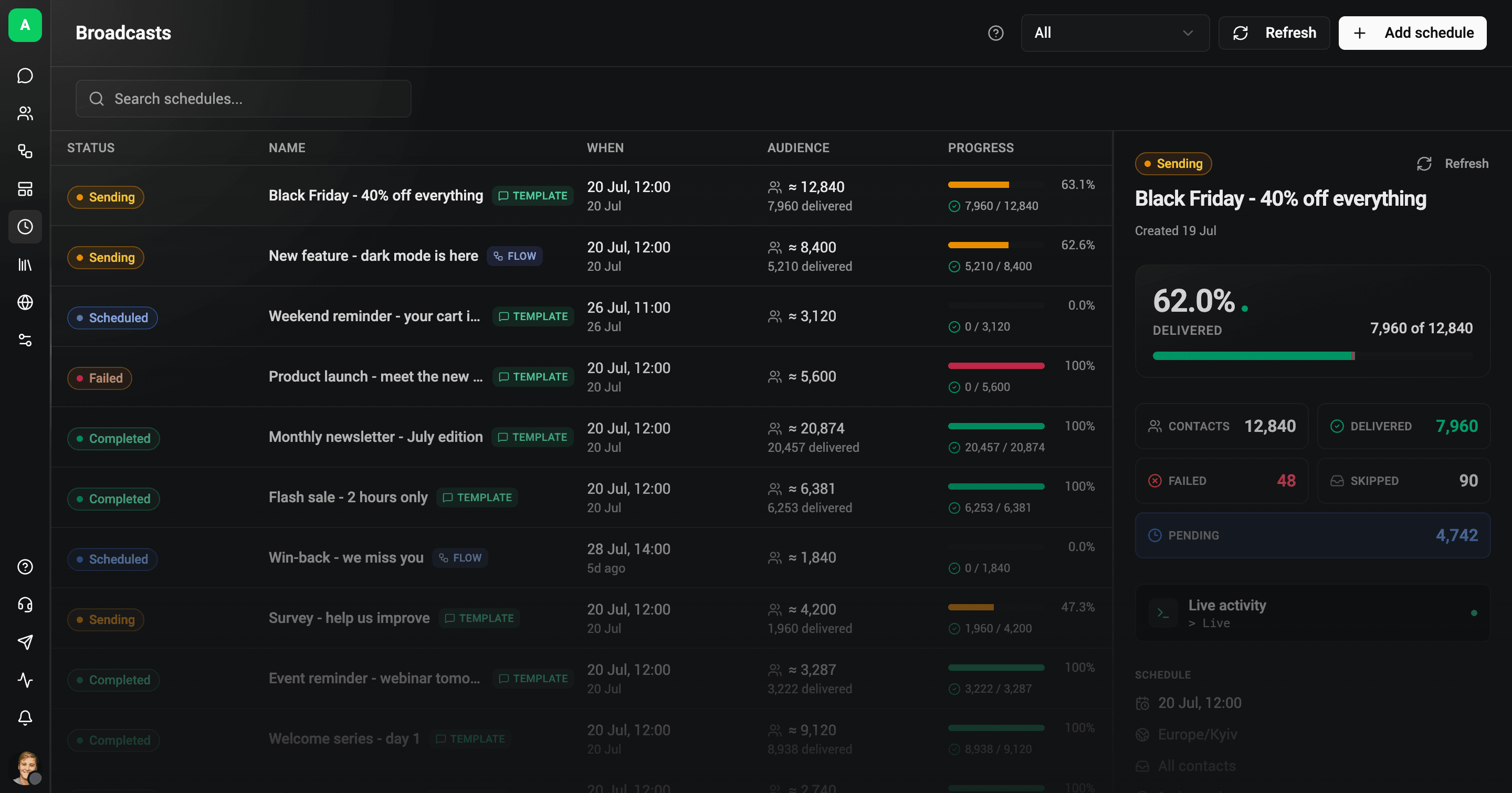
That live panel on the right is the whole point. Every campaign shows its status, sending, scheduled, completed or failed, and a real delivery breakdown: how many delivered, how many failed, skipped, or still pending. A broadcast list gives you none of that; you hit send and hope. A proper broadcast tells you exactly who got it, who didn't, and why, which is the difference between marketing and guessing.
So which method should you actually use?
Skip to your situation:
| Your situation | Use this | Why |
|---|---|---|
| Under 256 people who saved your number, occasional | Broadcast list | Free, private, built in |
| A team or community that should talk to each other | Group chat | Everyone sees everyone, by design |
| A handful of people, one time | Forwarding | Fastest for a one-off |
| Hundreds or thousands, or new leads, or you need analytics | WhatsApp Business API | Scales, personalizes, tracks, stays compliant |
| "Bulk sender" APK or extension | Avoid | Against WhatsApp's terms, gets you banned |
Honest version: for most personal use, the broadcast list is genuinely all you need, don't overthink it. The moment this is a business channel with real volume and new customers, the API is the only path that doesn't end in a ban, and a platform makes it a few clicks instead of a dev project, with an AI agent handling the replies.
Frequently Asked Questions
How many people can I message at once on WhatsApp?
With a broadcast list, up to 256 contacts per list, and only those who've saved your number will receive it. With the WhatsApp Business API there's no practical cap, you can message thousands, but recipients must have opted in first.
Can I send bulk WhatsApp messages for free?
Yes, within limits: broadcast lists to your saved contacts are free. "Free unlimited bulk" tools are the trap, they violate WhatsApp's terms and risk a ban. Genuinely free at scale doesn't exist, and I wrote an honest guide to a "free" WhatsApp Business API on exactly that. There's also a free AI WhatsApp automation offer worth a look.
Will I get banned for sending multiple messages?
Not for normal broadcast lists or groups. You get banned for spamming: unofficial bulk-sender apps, messaging people who didn't opt in, or blasting non-saved numbers. Stay on official methods and you're fine.
Do recipients see each other in a broadcast?
No. A broadcast list delivers to each person as a private one-on-one chat. Nobody sees the other recipients, and their replies come only to you. Groups are the opposite: there, everyone sees everyone.
How do I send the same message to people who haven't saved my number?
You can't with a broadcast list, that's its main limitation. Reaching non-saved contacts at scale requires the WhatsApp Business API with proper opt-in and approved templates.
If you've outgrown broadcast lists and want to send at scale without risking your number, that's exactly what we built Wexio for. Start free, connect WhatsApp, and schedule a personalized broadcast to a real audience with full delivery tracking, no bulk-sender sketchiness, no banned numbers.
More on doing WhatsApp right: build it into a winning WhatsApp sales strategy, run WhatsApp and Instagram from one shared team inbox, and see where WhatsApp for business is heading.