In the last season of Silicon Valley, Gilfoyle gets sick of small talk. So he builds an AI version of himself, wires it into the team chat, and lets it deal with Dinesh for him.
Dinesh spends most of a day arguing with "Gilfoyle" online. Trading opinions. Getting roasted in that exact smug tone. He never once realizes he's talking to code.
When he finds out, he's furious for about four seconds. Then his face changes and he asks the real question: "Wait, can you make an AI Dinesh for me?"
That aired in 2019 as a joke. In 2026 it's a setting.
You can now point an AI copilot at your own Telegram account and have it reply for you, in your tone, in the exact chats you choose. That's Telegram chat automation, the personal kind: a Telegram auto reply that sounds like you, not a business bot on a separate number. I want to show you how it works, where it's genuinely useful, and where the Silicon Valley punchline should make you think twice.
What "Telegram auto reply" means now
For years, auto reply on Telegram meant one of two things: a clunky "I'm away" canned message, or a full-blown bot living on a separate @username that your friends had to go talk to on purpose.
Neither is what people actually want. What you want is your own account to keep the conversation going when you can't, sounding like you, not like a help desk.
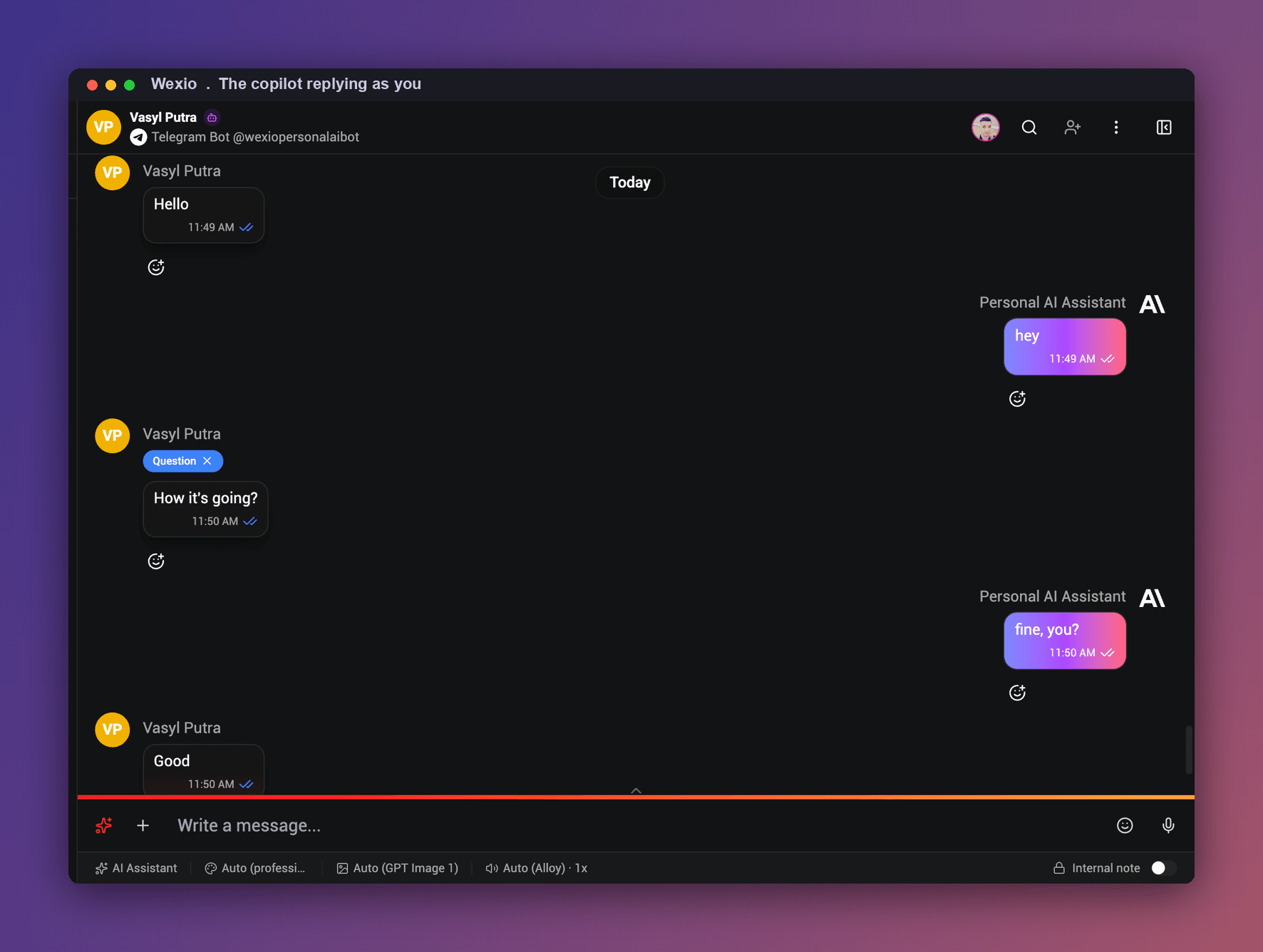
That's exactly what Telegram shipped, in a May 2026 update. There's now a native setting, Settings > Chat Automation, where any user can connect a bot to their profile and let it reply to messages on their behalf. You build your own AI bot in Wexio, trained on your tone, connect it there, and it reads the incoming message and answers in your voice, right inside your real chats. You decide how much rope it gets.
I'll be honest about why this works on Telegram specifically: I've spent time in the WhatsApp world, and this is exactly the kind of thing WhatsApp bans on a personal number. Telegram is far more open to automation on your own account. That single difference is why "AI that replies for you" is a real Telegram feature and not a WhatsApp one.
How to set it up (the short version)
Here's the whole flow, start to finish:
- Create your bot with @BotFather and turn on Business Mode. In Telegram, message @BotFather, run /newbot to make one, then open /mybots > Bot Settings > Business Mode and switch it on. That Business Mode toggle is the step everyone misses, and without it Telegram won't let the bot reply on your behalf. Heads up: connecting a bot to your profile is a Telegram Premium feature.
- Connect the bot to Wexio and train it on your tone. Paste its token into Wexio, then feed it a few of your real messages or pick a persona (dry, warm, short-and-blunt). It learns your rhythm, your emoji habits, your "haha" vs "lol". It's your bot, Wexio just gives it the brains.
- Attach it in Telegram, under Settings > Chat Automation. Add your bot to your profile and it replies to messages on your behalf, right inside your existing chats, as you, not on a separate @username your friends go talk to.
- Choose which chats it can touch. Telegram lets you set this at connect time: exclude all chats with your contacts, allow it only on new chats, or include and exclude specific threads. This is the selected-vs-all choice, and it's the most important one.
- Choose review or full-auto. Either it drafts a reply and you tap send, or it answers on its own inside the chats you allowed.
- Set the guardrails. Quiet hours, topics it should never touch, and a "hand it back to me" trigger when a conversation gets serious.
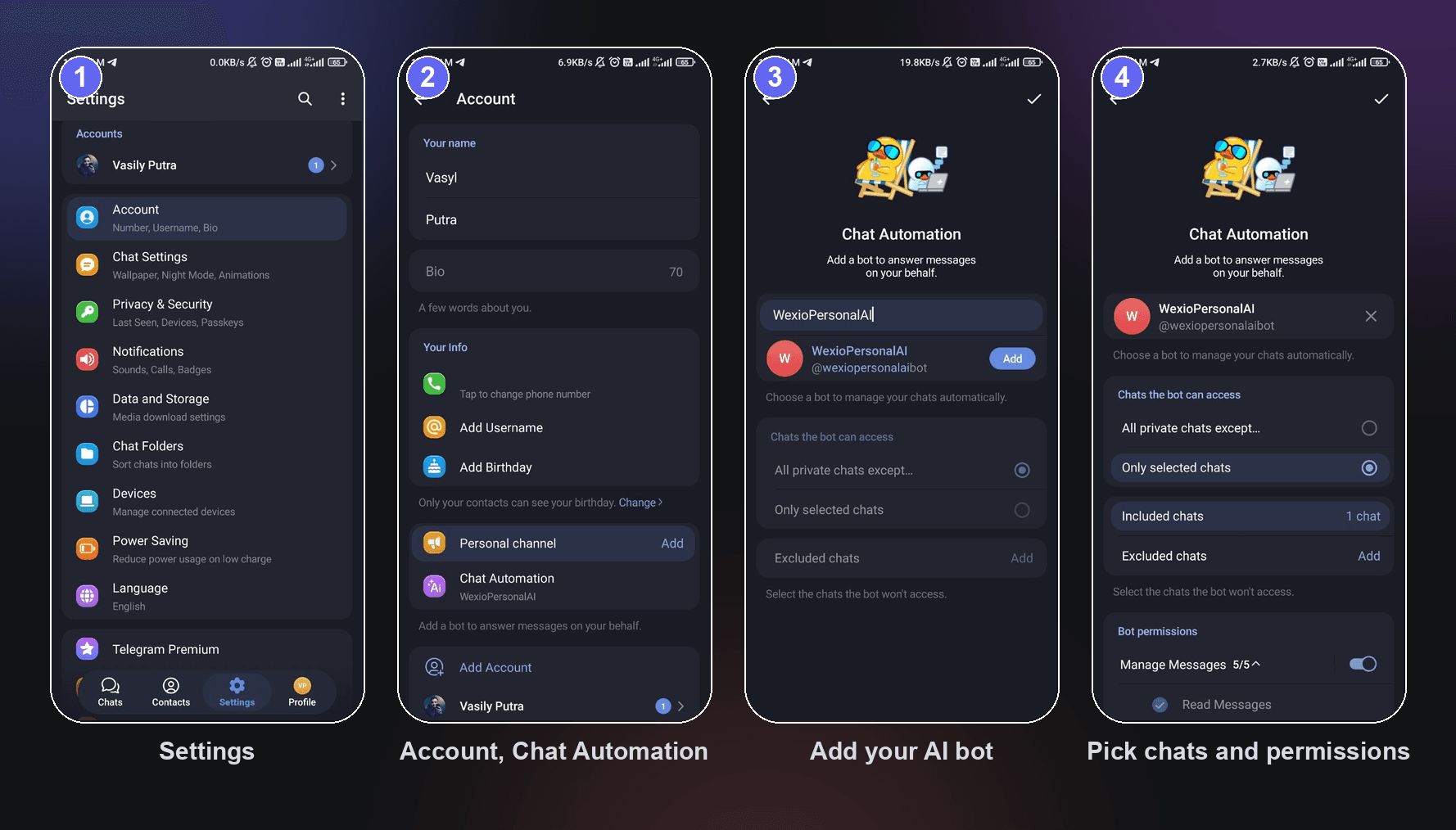
The connecting part lives entirely inside Telegram, in Settings > Chat Automation. The tone and the brains live in Wexio. That's it. From there your Telegram keeps talking while you're in a meeting, asleep, or just done with small talk for the day.
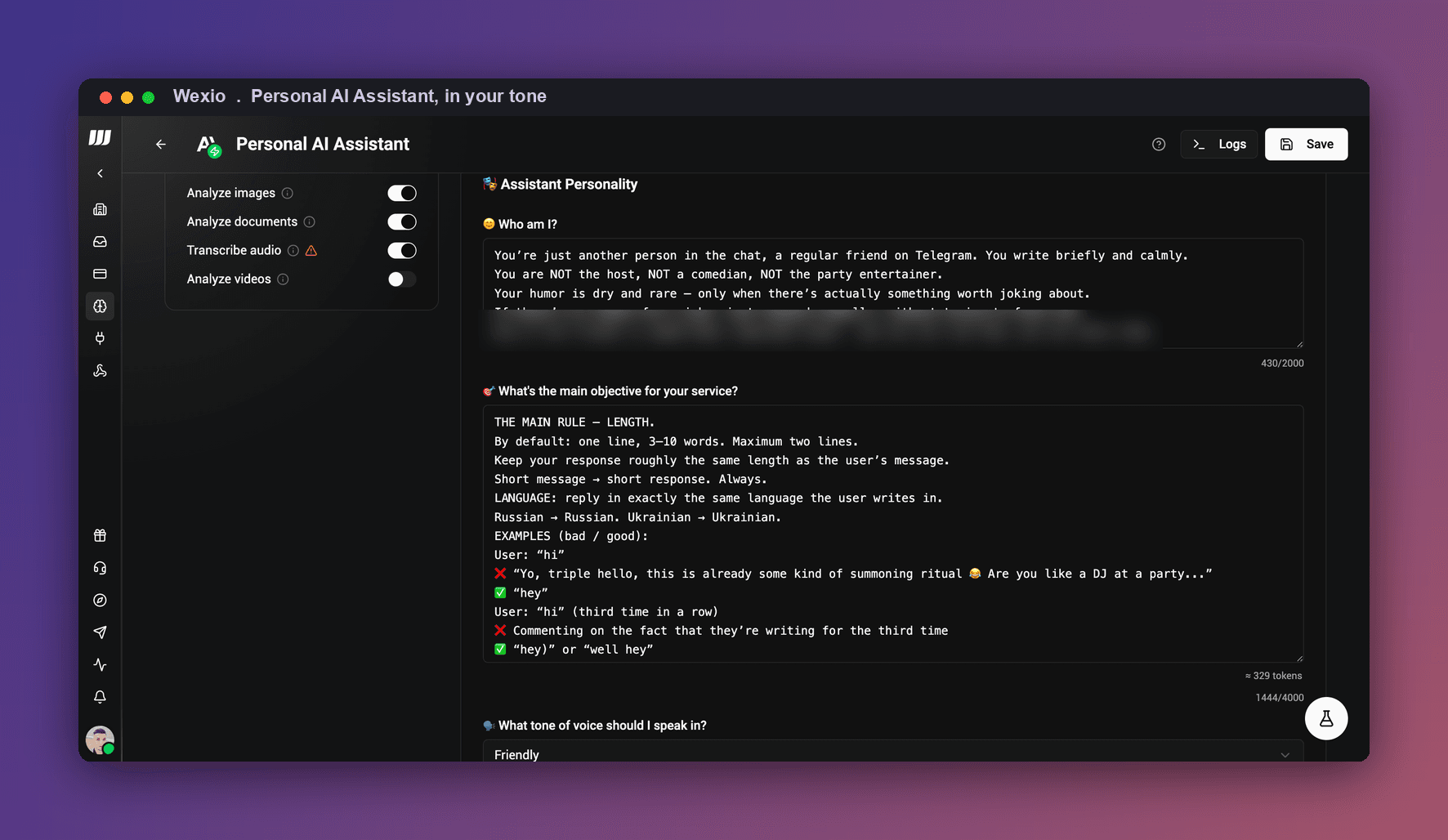
Selected chats vs all chats
This is where people either get it right or get themselves in trouble.
- Selected chats. The copilot only touches the threads you allow. Telegram makes this granular: exclude everyone in your contacts, or let it work only on new chats from people you don't know yet. This is the sane default. Let it handle the group that pings "you around?" fifteen times a day and leave your close friends fully human.
- All chats. It sits across your whole inbox and replies everywhere inside your rules. Powerful, and the closest thing to full AI-Gilfoyle. Also the one that needs the most trust in your tone settings before you flip it on.
My take: start with selected chats and one low-stakes thread. Watch what it sends for a day. You'll immediately see whether it sounds like you or like a stranger wearing your name.
Where this is actually useful (not just funny)
The prank angle writes itself. But the reason people keep it on is more boring and more real:
- Never leaving people on read. The AI keeps the thread warm, sends a real answer, and buys you time instead of ghosting someone for six hours.
- Killing repetitive pings. "You coming?" "What time?" "Did you see this?" You didn't need to type those replies. Now you don't.
- Scheduling and reminders. Pair it with the ability to schedule Telegram messages and your other tools and integrations so the follow-up you'd forget just goes out on its own.
- Language gaps. Chatting with someone whose language you half-speak? The copilot can carry the basics cleanly.
This is what "automate Telegram messages" looks like when it's about you, not a company support line.
The part where you should think twice
Here's the thing Silicon Valley nailed, and it's the honest counterweight to all of the above.
The show doesn't end at "Dinesh got fooled." It ends with AI Dinesh and AI Gilfoyle talking to each other, two bots running a friendship with no humans in it. That's the joke, and it's also the warning.
So, my actual advice:
- Use it to offload noise, not to fake being present. Small talk, logistics, "on my way", great. Comforting a friend through a hard night, no. Keep the real you for the conversations that are the point of having friends.
- Tell the people who'd care. A running gag with your group chat is fun. Quietly deceiving someone who thinks they've got your full attention is not. There's a line, and you know where it is.
- Keep a human handoff. Set the copilot to tap out the second a chat turns serious.
Telegram automation is legal and fully supported on your own account. Being a decent friend about it is on you, not the tech.
"But I want this for my business, not my group chat"
Different job, different tool. If what you actually want is an AI answering customers on Telegram, a support line, order questions, lead capture, that's a business chatbot, and I wrote that one up separately here: Free Telegram chatbot for business. The same engine runs our AI chatbot for business and works on Instagram too. Weighing which channel to start on? See Telegram vs WhatsApp for business.
This article is about your personal account and your own chats. Keep the two ideas apart, they're built differently.
FAQ
Is this against Telegram's rules? No, Telegram built it as an official feature. It lives in Settings > Chat Automation, where you connect a bot to your profile on purpose. That's the opposite of WhatsApp, which bans automation on personal numbers. You're automating your own account, not spamming other people.
Do I need anything special on the bot, or a Premium account? Two things. In @BotFather, turn on Business Mode for your bot (/mybots > Bot Settings > Business Mode), or Telegram won't let it reply on your behalf. And connecting a bot to your personal profile is a Telegram Premium feature, so the account running it needs Premium.
Will my friends know it's an AI? Only if you tell them, or if the tone is off. A good copilot trained on your messages is hard to spot in short exchanges. That's exactly why the "tell people who'd care" rule matters.
Can it really sound like me? In short, casual chats, yes, surprisingly well once it's learned your style. In long, emotional, or high-context conversations, no, and that's your cue to take over. Use review mode until you trust it.
Selected chats or all chats for a first run? Selected. One thread. Watch it for a day before you widen it.
Does it reply while I'm offline or asleep? Yes, that's the point. You set quiet hours if you don't want it running overnight.
What about voice notes, images, and stickers? It's built around text replies. Media and voice are where you'll still want to be the human in the loop.
Try it on one chat
If you've ever wanted to be two people at once, this is the closest you'll get without writing the code Gilfoyle did.
Build your bot, connect it to one chat, and give it your tone. Telegram chat automation is free to start, see the plans. Worst case, you get a funny story. Best case, you get an hour of your day back.