Most businesses assume growth requires a bigger budget. That's wrong. The real bottleneck isn't money: it's time wasted on repetitive tasks that a free automation stack could handle in seconds. In 2026, the gap between bootstrapped startups and funded competitors has never been narrower, thanks to an explosion of free-tier AI tools, open-source models, and no-code platforms. You don't need a developer team. You don't need a five-figure SaaS budget. You need a smart system that runs while you sleep. This is your guide to scaling your business for $0 using the automation tools available right now. Whether you run a beauty salon, a tutoring service, or a small retail brand, the playbook is the same: replace manual busywork with autonomous workflows, multiply your content output, and let AI handle the conversations you can't get to. The strategies here aren't theoretical. They're built on free tiers, open-source software, and platforms that let you start without a credit card. If you've been bleeding time on tasks a bot could do, this is your wake-up call.
The 2026 Zero-Budget Growth Framework
Growth without spending sounds like a fantasy. It's not. The 2026 automation ecosystem has matured to a point where free tools can genuinely replace what used to cost hundreds per month. The trick is knowing which tools to stack and how to connect them.
Your zero-budget framework rests on three pillars: open-source AI for intelligence, freemium platforms for execution, and no-code connectors for glue. When these three layers work together, you get a system that handles lead generation, content creation, customer support, and operations without a single paid subscription.
Leveraging Open-Source AI and Freemium Ecosystems
Open-source large language models have gotten shockingly good. Models like Llama 3 and Mistral's open-weight releases run on modest hardware and rival commercial APIs for most business tasks. You can deploy them locally for zero ongoing cost, handling everything from email drafting to customer query classification.
The freemium ecosystem has expanded too. Tools like n8n (self-hosted, free), HubSpot's free CRM tier, and Canva's free plan cover automation, customer management, and design. Stack these with a free messaging platform and you've got an operational backbone that costs nothing.
Here's a practical example. A small automotive repair shop could use a free CRM to capture leads, an open-source LLM to auto-generate follow-up emails, and a free-tier messaging tool to send appointment reminders. Total monthly cost: $0. Total time saved: 15-20 hours per week. According to a 2025 McKinsey report, small businesses using AI automation saw a median productivity increase of 27% within six months.
The key is connecting these tools so data flows between them without manual intervention. That's where the next piece comes in.
Shifting from Manual Tasks to Autonomous Workflows
Manual task management is a silent killer. Every time you copy data from one app to another, you're paying a "tab-switching tax" that chips away at your productive hours. The fix is autonomous workflows: sequences that trigger, execute, and complete without you touching them.
Step one: audit your daily tasks. Write down everything you do repeatedly. Sending confirmation messages, updating spreadsheets, posting on social media, replying to common questions. These are your automation candidates.
Step two: map each task to a trigger-action pair. A new form submission triggers a welcome message. A completed purchase triggers a review request. A missed appointment triggers a rebooking prompt.
Step three: build these workflows using a no-code tool. Platforms like n8n or Make (which offers a generous free tier) let you visually connect triggers to actions across dozens of apps. Wexio's Flow builder, for instance, lets you create visual drag-and-drop automations for customer conversations across WhatsApp, Telegram, Instagram, and Viber: no coding required, with a free tier offering 100 operations per month.
The shift from manual to autonomous isn't gradual. It's a switch you flip. Once your first workflow runs successfully, you'll wonder why you ever did it by hand.
Automating Lead Generation and Outbound Sales
Leads are oxygen for any business. But most small teams waste hours hunting for prospects manually, scrolling through social feeds, and sending one-off messages. Automation turns lead generation from a grind into a background process.
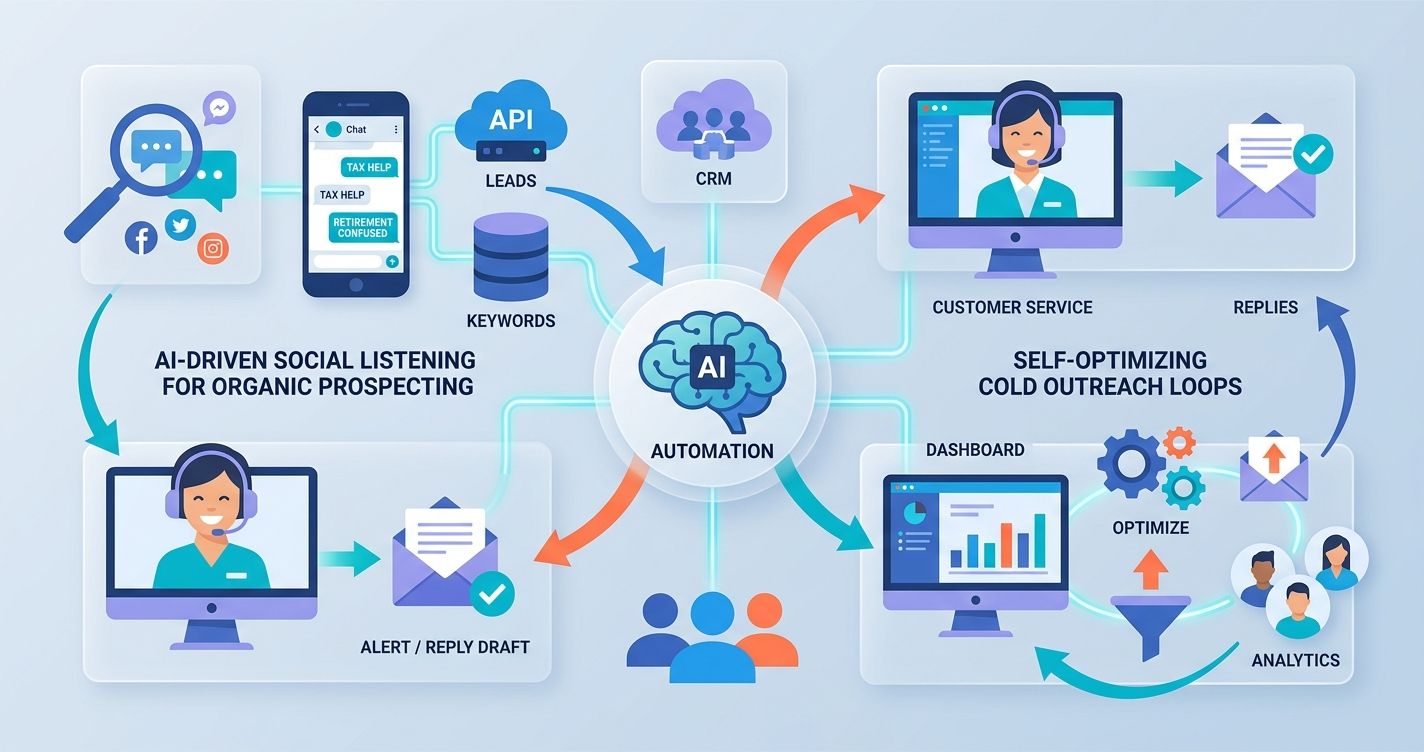
AI-Driven Social Listening for Organic Prospecting
Social listening means monitoring online conversations for signals that someone needs what you sell. In 2026, you can do this for free using open-source tools and platform APIs.
Set up keyword monitors on X (formerly Twitter), Reddit, and relevant Facebook groups. Free tools like Social Searcher or self-hosted alternatives let you track mentions of pain points related to your industry. A financial advisor might monitor phrases like "tax help" or "retirement planning confused." A beauty salon could track "wedding hair" or "last-minute appointment."
When a match appears, your automation sends you an alert or, better yet, drafts a helpful reply. The goal isn't to spam. It's to show up with genuine value exactly when someone is looking for it. This approach converts at significantly higher rates than cold outreach because the prospect has already expressed a need.
A 2025 Sprout Social study found that 76% of consumers appreciate brands that respond to social comments within an hour. An automated listening system lets you hit that window every time, even with a team of one.
Setting Up Self-Optimizing Cold Outreach Loops
Cold outreach still works. But only if you do it right. The 2026 approach uses AI to personalize at scale and feedback loops to improve performance automatically.
Here's the setup:
- Build a prospect list using free tools like Apollo.io's free tier (limited credits) or LinkedIn search exports.
- Feed each prospect's public info into an open-source LLM to generate a personalized first line and value proposition.
- Send the outreach via free email tools (Gmail with a sending schedule) or free-tier messaging platforms.
- Track open rates and reply rates in a spreadsheet or free CRM.
- Every week, feed your performance data back into the LLM with a prompt: "Here are my best-performing messages. Write five new variations."
This creates a self-improving loop. Your outreach gets better over time without you manually A/B testing. The LLM identifies patterns in what works and generates more of it. According to Woodpecker's 2025 outreach benchmark, personalized cold emails see a 2.3x higher reply rate than generic templates. An AI writing each one makes personalization effortless.
Content Multiplication via Generative AI
One piece of content should never stay as one piece. A single blog post can become ten social posts, a newsletter, a video script, and a carousel. Generative AI makes this multiplication instant and free.
Building a 24/7 Automated Social Media Engine
Consistency on social media is brutal for small teams. You know you should post daily. You rarely do. Automation fixes this permanently.
Start with a content calendar template in Google Sheets. Each row holds a topic, a target platform, and a posting date. Then connect that sheet to an AI content generator: either an open-source LLM running locally or a free-tier API like Google's Gemini.
Your workflow looks like this: every Monday, the automation reads the week's topics from your spreadsheet, generates platform-specific posts (short for X, longer for LinkedIn, visual captions for Instagram), and queues them in a free scheduling tool like Buffer's free plan or Later's starter tier.
The result? Seven days of content created in under ten minutes of your time. You review the drafts on Monday morning, tweak anything that feels off, and forget about social media for the rest of the week.
A healthcare clinic could auto-generate weekly health tips. A retail store could create product spotlights. An education company could share study advice. The content types vary, but the automation pattern is identical.
Using Browser Automation for Cross-Platform Distribution
Some platforms don't have APIs. Others restrict automated posting. Browser automation tools fill the gap. Free tools like Playwright or Puppeteer (both open-source) can simulate human browser actions: logging in, navigating to a posting form, pasting content, and clicking publish.
This is especially useful for platforms like certain forums, niche community sites, or messaging channels where API access is limited. You write a script once, and it distributes your content everywhere.
A word of caution: respect each platform's terms of service. Browser automation should supplement your presence, not replace genuine engagement. Use it for distribution, not for faking interactions.
For messaging channels specifically, tools like Wexio let you distribute content natively across WhatsApp, Telegram, Instagram, and Viber from a single dashboard. That eliminates the need for browser hacks on the platforms where your customers actually chat. With 12+ industry-specific automation templates available out of the box, you're not starting from scratch.
Streamlining Operations with No-Code Integration
Operations are where most small businesses hemorrhage time. Order processing, invoicing, appointment scheduling, inventory updates: these tasks eat hours every day. No-code integration turns them into background processes.
Connecting Free Tier APIs for End-to-End Delivery
Most modern tools expose APIs. Even on free tiers, you can connect them to create end-to-end workflows that handle entire business processes.
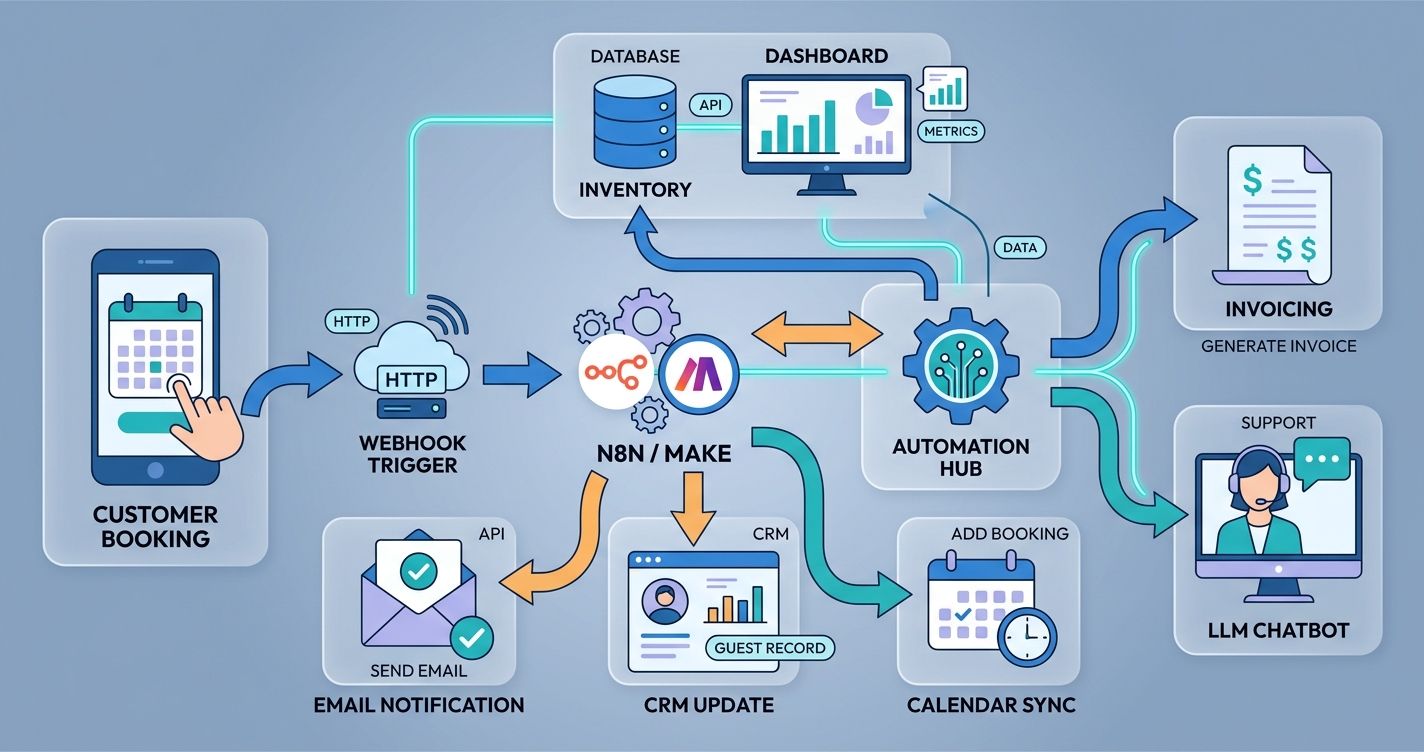
Here's a real example for a small hospitality business. A guest books through a free booking widget. That triggers a webhook to your automation platform, which creates a record in your free CRM, sends a confirmation via WhatsApp, adds the booking to Google Calendar, and generates a pre-arrival checklist in Google Docs. Five steps, zero manual work, zero cost.
The secret is treating APIs like Lego blocks. Each one does a small thing. Connected together, they build something powerful. Free-tier API limits are usually generous enough for small businesses: Google Sheets API allows 300 requests per minute, and most CRM free tiers support several hundred contacts.
Step one: identify your most time-consuming operational process. Step two: list every tool involved. Step three: check if each tool offers a free API or webhook. Step four: connect them using n8n, Make, or a similar free automation platform. Most integrations take under an hour to set up.
Automating Customer Support with Local LLM Chatbots
Customer support is a perfect automation target. Most queries are repetitive. "What are your hours?" "How do I book?" "What's your return policy?" An AI chatbot handles these instantly, 24/7.
Running a local LLM for customer support costs nothing after initial setup. You download a model like Llama 3 or Phi-3, fine-tune it on your FAQ document, and connect it to your messaging channels. The chatbot answers common questions, collects information from new leads, and escalates complex issues to a human.
The escalation part is critical. Set clear triggers for handing off to a live agent: negative sentiment detection, repeated failed responses, or an explicit request to speak with a person. Wexio's platform supports this with built-in AI assistants powered by GPT-4 and Claude, plus conditional branching in its Flow builder that routes conversations to operators when the bot hits its limits.
Review your chatbot's transcripts weekly. They're free user research. You'll spot logic gaps, unanticipated questions, and drop-off points that tell you exactly what to fix. Use median response satisfaction scores rather than averages: a few outlier complaints can skew your average and hide real performance.
Maintaining Quality and Human Oversight at Scale
Automation without oversight is a liability. One bad AI response to a customer can undo months of trust-building. The goal isn't to remove humans from the equation. It's to put humans where they matter most.
The 'Human-in-the-Loop' Verification Model
The human-in-the-loop model means AI handles the first draft, and a person approves, edits, or overrides before it reaches the customer. This applies to everything: outreach emails, social posts, chatbot responses, and operational workflows.
For low-risk tasks like internal data entry, full automation is fine. For customer-facing communication, build in a review step. Most no-code platforms let you add an approval node: the workflow pauses, sends you a notification, and waits for your green light before proceeding.
This doesn't slow things down as much as you'd think. Reviewing a pre-written email takes 10 seconds. Reviewing a batch of social posts takes five minutes. You're still saving 90% of the time compared to doing everything from scratch.
As your confidence in the system grows, you can gradually remove review steps for categories the AI handles well. But always keep human oversight on high-stakes interactions: complaints, refund requests, and anything involving sensitive data.
Future-Proofing Your Business Against Algorithm Shifts
Platforms change their algorithms constantly. A social media strategy that works in January might flop by June. An email deliverability trick that boosts open rates today could get you flagged tomorrow. Your automation system needs to adapt.
Build your workflows to be modular. Each component should be replaceable without rebuilding the entire system. If Buffer changes its free tier limits, you swap in another scheduler. If a social platform restricts API access, you switch to browser automation or a different channel.
Diversify your channels. Don't put all your eggs in one platform's basket. A mix of email, messaging apps, social media, and direct web traffic protects you from any single algorithm change. This is where an omnichannel approach pays off: if Instagram's reach drops, your WhatsApp and Telegram automations keep working.
Keep a monthly "automation audit" habit. Spend 30 minutes reviewing your workflow performance. Check which sequences are running, which have errors, and which metrics have shifted. This small investment prevents the slow decay that kills abandoned automation systems.
Stay current with platform changes by following their developer blogs and changelog pages. Most algorithm shifts are announced weeks in advance. If you're paying attention, you can adjust before the change hits.
Your Zero-Budget Scaling Playbook Starts Now
Scaling your business in 2026 doesn't require a bigger budget. It requires a smarter system. The tools are free. The AI models are open. The no-code platforms are generous with their starter tiers. What's missing is your decision to build the first workflow.
Start small. Pick one repetitive task you did today. Automate it this week. Then do another. Within a month, you'll have a system that runs your lead generation, content, support, and operations with minimal daily input. That's the real 2026 automation guide: not a single tool, but a connected ecosystem that grows with you.
If you're ready to automate customer conversations across WhatsApp, Telegram, Instagram, and Viber from one place, Wexio's free tier is a solid starting point: no credit card, AI-powered flows, and a visual builder that takes minutes to learn. Get started here and see what your first automated workflow can do.